Private beta

ENGINEERED AI AGENTS FOR PRODUCT DESIGN

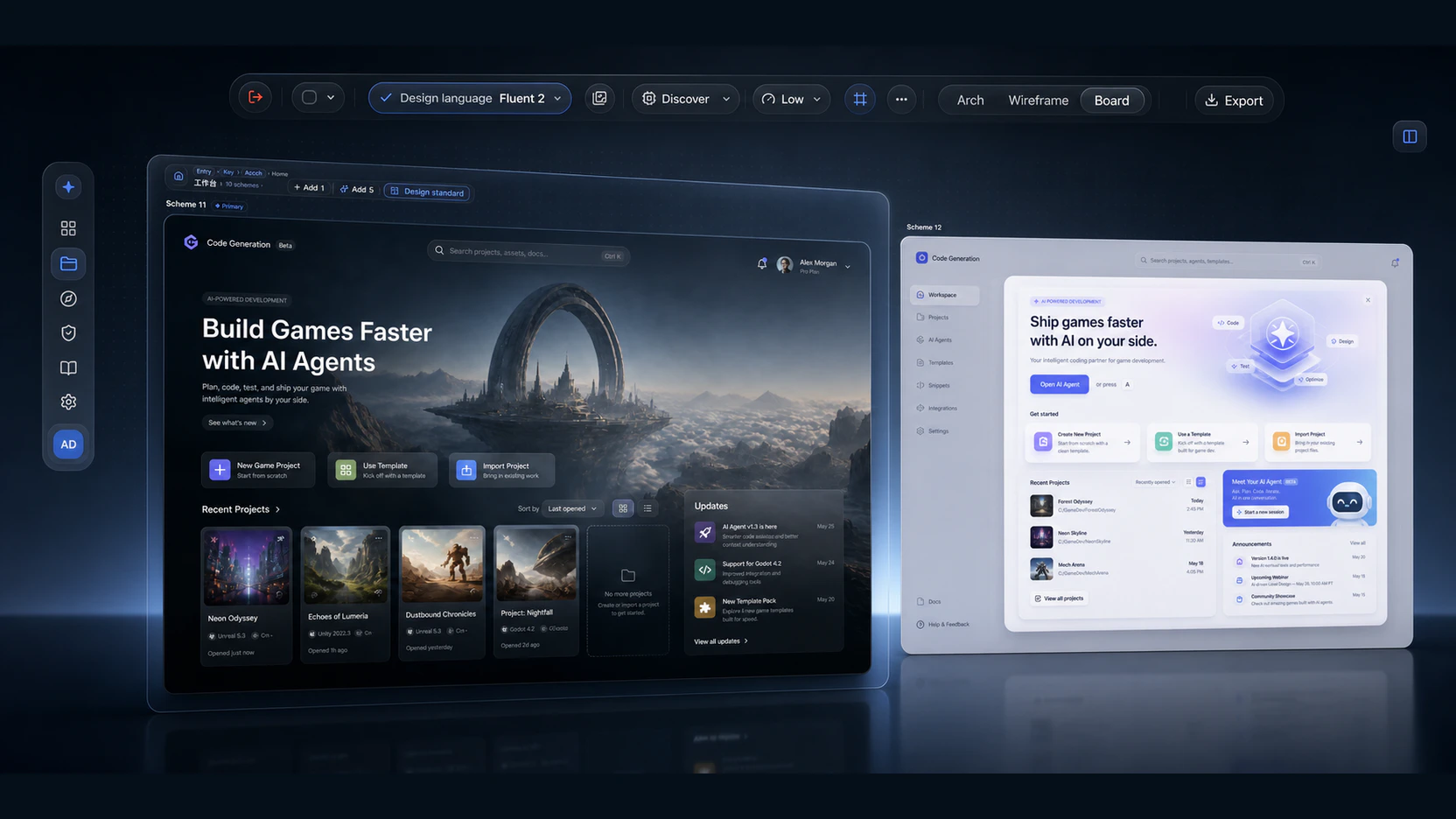
Engineered agents.Consistent style. Faster exploration.

Engineered agents run research through QA in one workflow; layered context keeps styles consistent, so new looks are fast to try and compare.

Get started

Available to existing beta accounts. Self-serve registration is not open yet.

Real product interface
01Specialized agents
02Structured operations
03Style context
04Validated results

ONE WORKSPACE · ENGINEERED AGENTS

Specialized agents, engineered as a sequence.

Every stage has explicit inputs, outputs, and validation. Architecture and wireframes advance through structured operations; generation tasks expose stages, queues, and retries; each next stage reads the context already confirmed before it.

  1. 1Research
  2. 2Structure
  3. 3Wireframe
  4. 4Generate
  5. 5QA & iterate

THREE SYSTEM ADVANTAGES

Engineered agents, consistent style, and fast visual exploration.

All three share the same project context, so AI can advance the work, preserve constraints, and compare directions—not just return a single image.

Agent orchestration

Split complex design into specialized agent tasks

Product briefs, market research, page architecture, wireframes, visual generation, edit alignment, and QA each run through the appropriate AI pipeline, then hand off inside one project.

Context
Research
Architecture
Wireframe
Visual
QA
Agent handoff06 / 06

Structured operations

Advance the work through structured operations

Page-tree and wireframe edits are not wholesale rewrites. Operations pass rules, deduplication, and structural validation before applying to the current canvas, with confirmation gates for risky removals.

Structured operation queue03
01ADD_SECTIONValidated
02MOVE_MODULEApplied
03UPDATE_COPYDeduped
Consistency controls

Lock style with layered context

Choose from 100 design languages or references, then keep theme colors, page-level standards, and the primary wireframe in the context for future generations.

Design languagePrecision dark
Theme color#0A84FF
Primary wireframeDesktop · V3
Page standards12 rules
Anchor inheritance

Carry one visual direction across pages

A key page can act as the visual anchor, while parent pages and reference images continue into related page generations—without rediscovering the style page by page.

Visual anchorInherited
Home
Analytics
Report
Fast style exploration

Try new styles quickly on the same page

Add one or five schemes at a time and compare them side by side in the Design Board. Switching the design language or references affects future generations while existing results stay on the canvas.

DESIGN LANGUAGEQuiet precision

Low contrast · 8px grid

Iterate & deliver

Move from exploration to convergence in one loop

Keep editing a specific scheme through chat, marked regions, visual QA, or regeneration, then export the generated screens and page-structure manifest.

Converge and deliver3 / 3
Visual consistencyPassed
Layout integrityPassed
Page manifestPassed

HOW THE AGENTS WORK

How specialized agents hand off a product design.

Each step produces structured context the next step can consume.

  1. 01

    Build executable product context

    Set product type, platforms, theme colors, and the product brief, then structure it into goals, users, and core needs.

    PROJECT CONTEXTLIVE
    Executable product context
    01Platforms02Core users03Theme04Product brief
  2. 02

    Let the architecture agent plan the page system

    Generate a page tree from product context and market research, then add siblings, children, and page modules while calibrating the structure on canvas.

    PAGE SYSTEMLIVE
    Page system established
    01Home02Workspace03Analytics04Export
  3. 03

    Let the wireframe agent resolve information structure

    Generate multiple grayscale layouts, refine them through block-level edits or chat, and hand the selected primary wireframe to visual generation.

    STRUCTURED OPSLIVE
    Validate before applying
    01Rules02Deduplication03Structure04Confirmation
  4. 04

    Let the visual agent inherit style and keep exploring

    Generate high-fidelity schemes from the design language, references, theme, primary wireframe, and page anchors, then converge through chat, annotations, and QA before export.

    STYLE LOOPLIVE
    Explore, inherit, validate
    01Language02Anchors03Annotations04QA

BUILT FOR CONTROLLED EXPLORATION

Stay consistent across complex systems—and still try new directions fast.

01

Agent-driven design for complex new products

Carry product definition, architecture, wireframes, visual generation, and QA through one shared context.

02

Style consistency across many pages

Constrain the system with design sources, theme colors, primary wireframes, page standards, and anchors.

03

Fast exploration of new styles

Generate several directions for the same page, keep prior results, and continue switching the visual source.

04

Directed redesign of an existing page

Upload a screenshot, set the optimization direction, then generate, annotate, edit through chat, and export.

PRODUCT QUESTIONS

About XSuperflow

Direct answers about the product, style control, exploration, and private-beta access.

01What is XSuperflow?

XSuperflow is an AI workspace for product design. Specialized agents connect product research, page architecture, wireframes, visual generation, edit alignment, and QA.

02How does XSuperflow keep styles consistent across pages?

Each generation continues to use the selected design language or references, theme colors, page standards, primary wireframe, and page anchors so related pages share confirmed visual context.

03Can teams explore different design styles quickly?

Yes. The Design Board can generate and retain multiple schemes for the same page. Changing the design language or references affects future generations, making new directions easy to compare side by side.

04Can I register for XSuperflow now?

Self-serve registration is not available. XSuperflow is in private beta and is currently open only to provisioned beta accounts.

05How do existing beta users enter the product?

Select “Get started” anywhere on this page to open the XSuperflow sign-in page.

PRIVATE BETA

The agents are working. The product is still in private beta.

XSuperflow is currently available to provisioned beta accounts. Self-serve registration is not open yet. Existing users can go straight to the product.

Get startedAlready have a beta account? Continue to the XSuperflow sign-in page.